

QUESTION NO: 1

Correct Answer: D
Vote an answer
Explanation: Only visible for Actual4test members. You can sign-up / login (it's free).
QUESTION NO: 2


Correct Answer:

Explanation

Enabling Branch Office Direct Printing is a new feature in Windows Server 2012 R2 that helps branch-office sites reduce their wide area network (WAN) usage by printing directly to a print device instead of spooling print jobs to a print queue on the print server.
Branch Office Direct Printing can reduce Wide Area Network (WAN) usage by printing directly to a print device instead of a server print queue. This feature can be enabled or disabled on a per printer basis and is transparent to the user. It is enabled by an administrator using the Print Management Console or Windows PowerShell on the server.
The printer information is cached in the branch office, so that if the print server is unavailable for some reason (for example if the WAN link to the data center is down), then it is still possible for the user to print.
Branch Office Direct Printing requires the following operating systems:
Windows Server 2012
Windows 8
References:
Training Guide: Installing and Configuring Windows Server 2012 R2, Chapter 9: Print and Document Services, Lesson 1: Deploying and managing print servers, p. 443
http://technet.microsoft.com/en-us/library/jj134156
http://technet.microsoft.com/en-us/library/jj134152.a
QUESTION NO: 3

Correct Answer: F
Vote an answer
Explanation: Only visible for Actual4test members. You can sign-up / login (it's free).

QUESTION NO: 5


Correct Answer:

Explanation
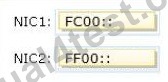
An IPv6 multicast address always begins with 11111111 or FF and includes additional structure that identifies the scope of the address and the multicast group to which the interface belongs.IPv6 multicast addresses, therefore, are always of the form FF00::/8.
Reference: http://www.ianA. org/assignments/ipv6-address-space/ipv6-address-spacE. xml
QUESTION NO: 6


Correct Answer:

Explanation

dd
https://technet.microsoft.com/en-us/library/dn303416(v=ws.11).aspx
QUESTION NO: 7

Correct Answer: C,D
Vote an answer
Explanation: Only visible for Actual4test members. You can sign-up / login (it's free).




QUESTION NO: 9

Correct Answer: B
Vote an answer
Explanation: Only visible for Actual4test members. You can sign-up / login (it's free).
QUESTION NO: 10
Correct Answer: A,B
Vote an answer
Explanation: Only visible for Actual4test members. You can sign-up / login (it's free).
QUESTION NO: 11


Correct Answer:

Explanation

References:
http://technet.microsoft.com/library/hh831416
http://technet.microsoft.com/en-us/library/dd469766%28v=WS.10%29.aspx
Exam Reference: 70-410: Installing and Configuring Windows Server 2012 R2, Chapter4: Deploying and configuring core network services, Objective 4.1: Configure IPv4 and IPv6 addressing, p.192, 196
QUESTION NO: 12

Correct Answer: D
Vote an answer
Explanation: Only visible for Actual4test members. You can sign-up / login (it's free).

QUESTION NO: 14

Correct Answer: B
Vote an answer
Explanation: Only visible for Actual4test members. You can sign-up / login (it's free).
QUESTION NO: 15


Correct Answer:
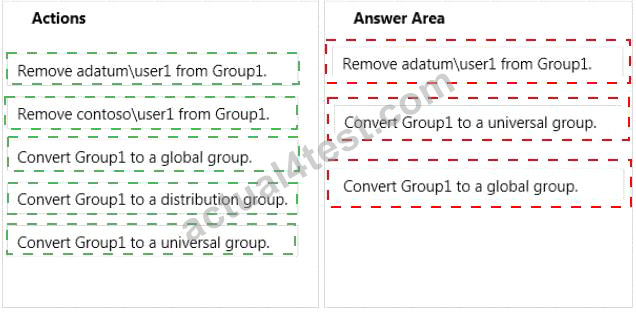
Explanation
1) Remove adatum\user1 from Group1
2) Convert Group1 to a universal group
3) Convert Group1 to a global group
Domain local Groups that are used to grant permissions within a single domain. Members of domain local groups can include only accounts (both user and computer accounts) and groups from the domain in which they are defined.
---- to review. Universal groups can only include objects from its own forest Groups can have - domain local, built-in local, global, and universal. That is, the groups have different areas in different scopes which they are valid.
A domain local group is a security or distribution group that can contain universal groups, global groups, other domain local groups from its own domain, and accounts from any domain in the forest. You can give domain local security groups rights and permissions on resources that reside only in the same domain where the domain local group is located. A global group is a group that can be used in its own domain, in member servers and in workstations of the domain, and in trusting domains. In all those locations, you can give a global group rights and permissions and the global group can become a member of local groups. However, a global group can contain user accounts that are only from its own domain. A universal group is a security or distribution group that contains users, groups, and computers from any domain in its forest as members. You can give universal security groups rights and permissions on resources in any domain in the forest. Universal groups are not supported.
Domain local -Groups that are used to grant permissions within a single domain. Members of domain local groups can include only accounts (both user and computer accounts) and groups from the domain in which they are defined. Built-in local - Groups that have a special group scope that have domain local permissions and, for simplicity, are often referred to as domain local groups. The difference between built-in local groups and other groups is that built-in local groups can't be created or deleted. You can only modify built-in local groups. References to domain local groups apply to built-in local groups unless otherwise noted. Global - Groups that are used to grant permissions to objects in any domain in the domain tree or forest. Members of global groups can include only accounts and groups from the domain in which they are defined. Universal - Groups that are used to grant permissions on a wide scale throughout a domain tree or forest. Members of global groups include accounts and groups from any domain in the domain tree or forest.
Global to universal. This conversion is allowed only if the group that you want to change is not a member of another global scope group.
Domain local to universal. This conversion is allowed only if the group that you want to change does not have another domain local group as a member.
Universal to global. This conversion is allowed only if the group that you want to change does not have another universal group as a member.
Universal to domain local. There are no restrictions for this operation.