

QUESTION NO: 1

Correct Answer: D
Vote an answer
Explanation: Only visible for Actual4test members. You can sign-up / login (it's free).


QUESTION NO: 3


Correct Answer: D
Vote an answer
Explanation: Only visible for Actual4test members. You can sign-up / login (it's free).
QUESTION NO: 4


Correct Answer: D
Vote an answer
Explanation: Only visible for Actual4test members. You can sign-up / login (it's free).
QUESTION NO: 5


Correct Answer: C
Vote an answer
Explanation: Only visible for Actual4test members. You can sign-up / login (it's free).
QUESTION NO: 6


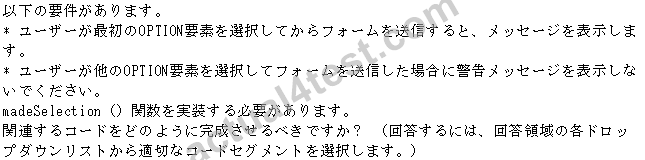


Correct Answer:

Explanation

* The <select> element is used to create a drop-down list.
The <option> tags inside the <select> element define the available options in the list.
* option.value
text
Specifies the value to be sent to a server
Reference: HTML <option> Tag
QUESTION NO: 7


Correct Answer: D
Vote an answer
Explanation: Only visible for Actual4test members. You can sign-up / login (it's free).
QUESTION NO: 8

Correct Answer: A
Vote an answer
Explanation: Only visible for Actual4test members. You can sign-up / login (it's free).
QUESTION NO: 9


Correct Answer:

Explanation
Box 1:

Box 2:

Box 3:

Note:
Use > for greater than comparison.
Use < for less than comparison.
QUESTION NO: 10


Correct Answer:

Explanation

Use ajax technology (json is for the datatype).
Disable the cache as the most recent data must be displayed.
QUESTION NO: 11


Correct Answer:

Explanation
getElementById
"yellowDiv"
"yellow"
https://www.w3schools.com/jsref/prop_style_border.asp
QUESTION NO: 12

Correct Answer: A
Vote an answer
Explanation: Only visible for Actual4test members. You can sign-up / login (it's free).
QUESTION NO: 13


Correct Answer:

Explanation
No
Yes
No
https://www.w3schools.com/cssref/pr_margin-left.asp
https://css-tricks.com/almanac/properties/t/transition/
https://www.w3schools.com/cssref/css3_pr_transition.asp


