


SC-300 Practice Exams and Training Solutions for Certifications
Dumps Free Test Engine Player Verified Answers
NEW QUESTION # 197
Hotspot Question
Your network contains an on-premises Active Directory Domain Services (AD DS) domain named fabrikam.com. The domain contains an Active Directory Federation Services (AD FS) instance and a member server named Server1 that runs Windows Server. The domain contains the users shown in the following table.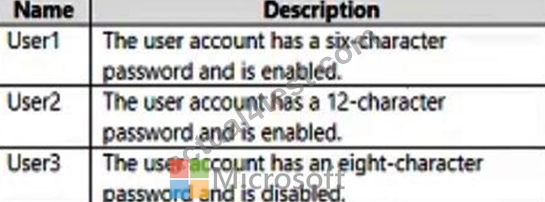
You have a Microsoft Entra tenant named contoso.com that is linked to a Microsoft 365 subscription.
You establish federation between fabrikam.com and contoso.com by using a Microsoft Entra Connect instance that is configured as shown in the following exhibit.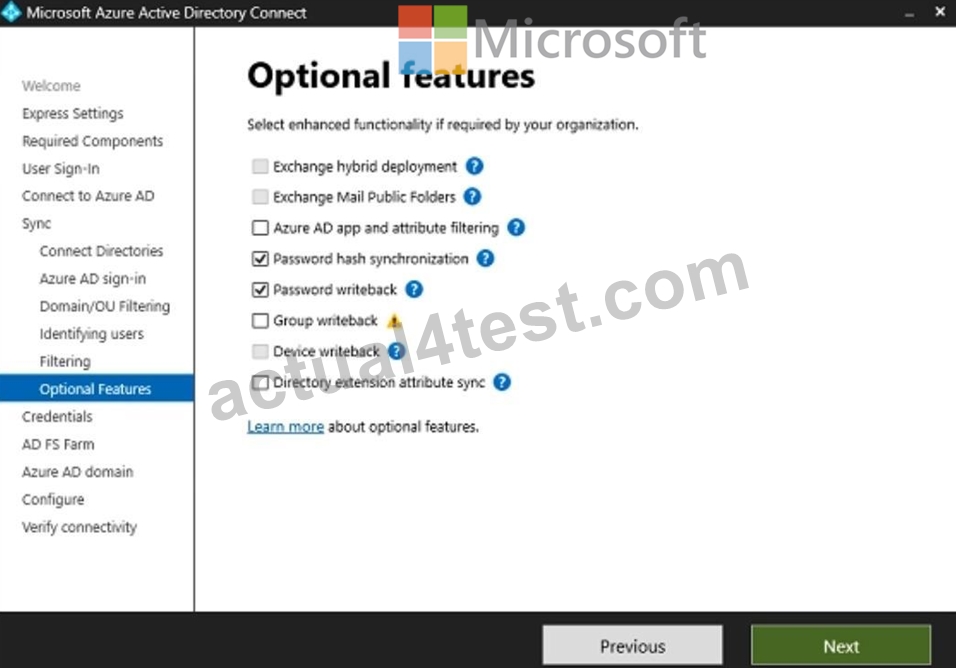
You perform the following tasks in contoso.com:
- Create a group named Group1.
- Disable User2.
- Enable User3.
For each of the following statements, select Yes if the statement is true. Otherwise, select No.
NOTE: Each correct selection is worth one point.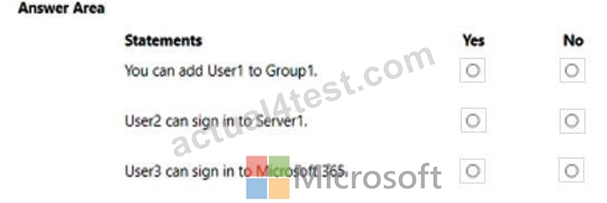
Answer:
Explanation: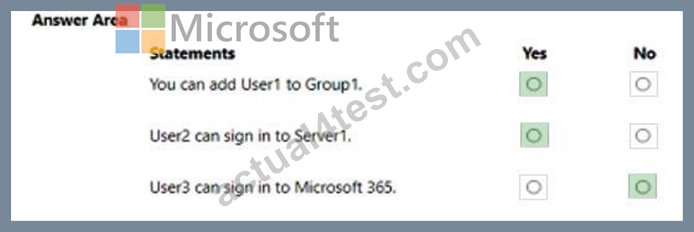
Explanation:
Box 1: Yes
Group1 is created in the entra ID tenant, and the user is synced, so this is possible. It doesn't state that the group should be visible on-prem.
Box 2: Yes
The user is a directory-synced user, so authority lies on-prem. Disabling it from the Entra ID portal will have no effect. The server is also an on-prem server. Disabling should be done in on- prem adds.
Box 3: No
You enable the account in the entra id tenant, but the account is directory synced, so authority lies with the on-prem AD, enabling from the portal is not possible.
NEW QUESTION # 198
You have an Azure Active Directory (Azure AD) tenant that contains the objects shown in the following table.
Which objects can you add as members to Group3?
- A. User1, User2, Group1 and Group2
- B. User2 only
- C. User2, Group1, and Group2 only
- D. User1 and User2 only
- E. User2 and Group2 only
Answer: B
Explanation:
Reference:
https://bitsizedbytes.wordpress.com/2018/12/10/distribution-security-and-office-365-groups-nesting/
NEW QUESTION # 199
You have an Azure subscription that contains a user named User1.
You need to meet the following requirements:
- Prevent User1 from being added as an owner of newly registered apps.
- Ensure that User1 can manage the application proxy settings.
- Ensure that User1 can register apps.
- Use the principle of least privilege.
Which role should you assign to User1?
- A. Application administrator
- B. Cloud application administrator
- C. Application developer
- D. Service support administrator
Answer: A
Explanation:
Application Administrator = Can create and manage all aspects of app registrations and enterprise apps.
Cloud Application Administrator = Can create and manage all aspects of app registrations and enterprise apps ***except App Proxy***.
Service Support Administrator = Can read service health information and manage support tickets.
Application Developer = Can create application registrations independent of the 'Users can register applications' setting.
https://learn.microsoft.com/en-us/azure/active-directory/roles/permissions-reference
NEW QUESTION # 200
You have a Microsoft Entra tenant that contains the groups shown in the following table.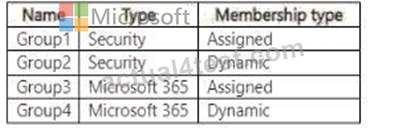
You need to implement Privileged Identity Management (PIM) for the groups.
Which groups can be managed by using PIM?
- A. Group1 and Group2 only
- B. Group1 and Group3 only
- C. Group3 and Group4 only
- D. Group1 only
- E. Group1. Group2. Group3. and Group4
Answer: B
NEW QUESTION # 201
You have a Microsoft 365 E5 subscription that contains two users named User1 and User2.
You need to ensure that User1 can create access reviews for groups, and that User2 can review the history report for all the completed access reviews. The solution must use the principle ofleast privilege.
Which role should you assign to each user? To answer, drag the appropriate roles to the correct users. Each role may be used once, more than once, or not at all. You may need to drag the split bar between panes or scroll to view content NOTE: Each correct selection is worth one point.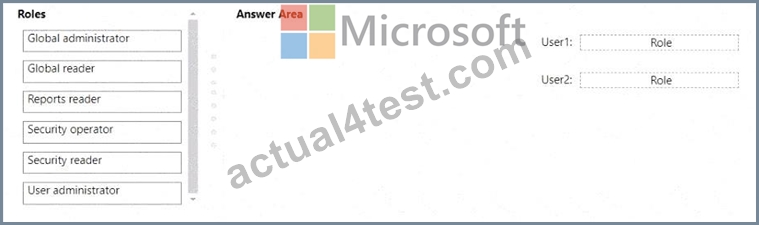
Answer:
Explanation: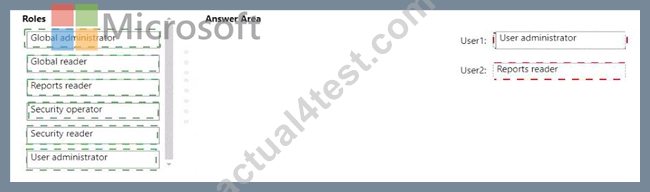
Explanation:
< User1: User administrator
User2: Reports reader
According to the Microsoft SC-300: Identity and Access Administrator Study Guide and the Exam Ref SC-
300: Microsoft Identity and Access Administrator, Azure AD includes several predefined roles that control delegated administrative permissions in the directory. Access reviews in Azure AD (part of Identity Governance) can be created and managed by specific roles, depending on their intended task.
The User administrator role is designed for managing users and groups. It allows the user to create and manage access reviews for groups and applications within the organization. This includes the ability to start new reviews, modify existing ones, and manage reviewers. Therefore, User1, who must create access reviews, requires this role.
On the other hand, the Reports reader role is a read-only administrative role that allows viewing of all audit logs, sign-in logs, and reports, including access review history reports. This role cannot create or modify reviews but can access and review the outcomes of completed reviews. Therefore, User2, who needs to review historical access review reports, should be assigned the Reports reader role.
Microsoft Learn's "Manage access reviews in Azure AD Identity Governance" module and the SC-300 Learning Path confirm:
"User administrators can create and manage access reviews for users, groups, and applications. Reports readers can view the access review results and history reports but cannot create or modify them
NEW QUESTION # 202
You have a Microsoft 365 E5 subscription.
You need to create a dynamic user group that will include all the users that do NOT have a department defined in their user profile.
How should you complete the membership rule? To answer, select the appropriate options in the answer area.
NOTE: Each correct selection is worth one point.
Answer:
Explanation:
Explanation:
The SC-300 materials on Dynamic membership rules for groups specify that user attributes can be evaluated with comparison operators such as -eq, -ne, -match, -notIn, etc. For attributes that may be unset, the documentation explains that you can compare the attribute to the literal null to target users with no value. The guide's rule syntax section states that for string attributes like user.department, "to include users where an attribute has no value, compare the attribute to null (for example, (user.department -eq null))." It further clarifies that quoted strings (for example, "null") are treated as the literal word null, not as the absence of a value, and that $null is not used in Azure AD dynamic rule syntax. Because the requirement is to include all users that do not have a department defined, the correct expression is to select users where the department attribute is empty/unset, which is achieved with the equals operator against null. Therefore, the completed rule is (user.department -eq null), which adds only those users whose profile has no Department value.
NEW QUESTION # 203
You have a Microsoft 365 subscription.
You plan to deploy an app named App1 that will have the following configurations:
* Will be registered in Microsoft Entra
* Will run as a service without user interaction
* Will collect audit logs associated with user sign-ins
* Will access resources by using the Microsoft Graph API
You need to ensure that App1 can access Microsoft Graph.
What should you use?
- A. a built-in role-based access control (RBAC) role
- B. application permissions
- C. a custom role-based access control (RBAC) role
- D. delegated permissions
Answer: D
NEW QUESTION # 204
Your network contains an Active Directory forest named contoso.com that is linked to an Azure Active Directory (Azure AD) tenant named contoso.com by using Azure AD Connect.
You need to prevent the synchronization of users who have the extensionAttribute15 attribute set to NoSync.
What should you do in Azure AD Connect?
- A. Configure an Export run profile.
- B. Configure a Full Import run profile.
- C. Create an inbound synchronization rule for the Active Directory Domain Services connector.
- D. Create an inbound synchronization rule for the Windows Azure Active Directory connector.
Answer: C
Explanation:
Explanation
https://docs.microsoft.com/en-us/azure/active-directory/hybrid/how-to-connect-sync-change-the-configuration
NEW QUESTION # 205
You need to meet the technical requirements for the probability that user identities were compromised.
What should the users do first, and what should you configure? To answer, select the appropriate options in the answer area.
NOTE: Each correct selection is worth one point.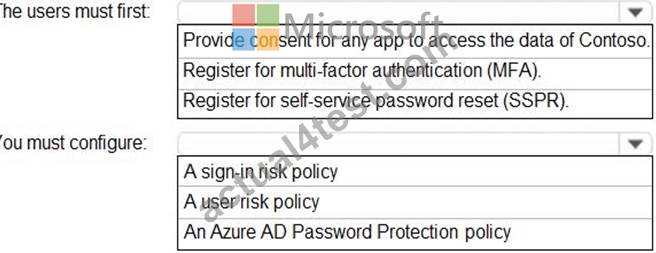
Answer:
Explanation: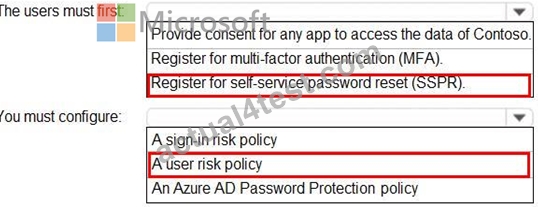
Reference:
https://docs.microsoft.com/en-us/azure/active-directory/identity-protection/concept-identity-protection-policies
Topic 2, Litware, Inc
Identity Environment
The network contains an Active Directory forest named litware.com that is linked to an Azure Active Directory (Azure AD) tenant named litware.com. Azure AD Connect uses pass-through authentication and has password hash synchronization disabled.
Litware.com contains a user named User1 who oversees all application development. Litware implements Azure AD Application Proxy.
Fabrikam has an Azure AD tenant named fabrikam.com. The users at Fabrikam access the resources in litware.com by using guest accounts in the litware.com tenant.
Cloud Environment
All the users at Litware have Microsoft 365 Enterprise E5 licenses. All the built-in anomaly detection polices in Microsoft Cloud App Security are enabled.
Litware has an Azure subscription associated to the litware.com Azure AD tenant. The subscription contains an Azure Sentinel instance that uses the Azure Active Directory connector and the Office 365 connector. Azure Sentinel currently collects the Azure AD sign-ins logs and audit logs.
On-premises Environment
The on-premises network contains the severs shown in the following table.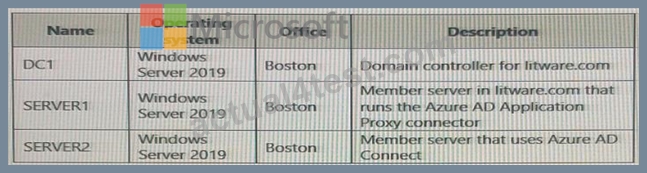
Both Litware offices connect directly to the internet. Both offices connect to virtual networks in the Azure subscription by using a site-to-site VPN connection. All on-premises domain controllers are prevented from accessing the internet.
Delegation Requirements
Litware identifies the following delegation requirements:
* Delegate the management of privileged roles by using Azure AD Privileged Identity Management (PIM).
* Prevent nonprivileged users from registering applications in the litware.com Azure AD tenant-
* Use custom catalogs and custom programs for Identity Governance.
* Ensure that User1 can create enterprise applications in Azure AD. Use the principle of least privilege.
Licensing Requirements
Litware recently added a custom user attribute named LWLicenses to the litware.com Active Directory forest. Litware wants to manage the assignment of Azure AD licenses by modifying the value of the LWLicenses attribute. Users who have the appropriate value for LWLicenses must be added automatically to Microsoft 365 group that he appropriate license assigned.
Management Requirement
Litware wants to create a group named LWGroup1 will contain all the Azure AD user accounts for Litware but exclude all the Azure AD guest accounts.
Authentication Requirements
Litware identifies the following authentication requirements:
* Implement multi-factor authentication (MFA) for all Litware users.
* Exempt users from using MFA to authenticate to Azure AD from the Boston office of Litware.
* Implement a banned password list for the litware.com forest.
* Enforce MFA when accessing on-premises applications.
* Automatically detect and remediate externally leaked credentials
Access Requirements
Litware wants to create a group named LWGroup1 that will contain all the Azure AD user accounts for Litware but exclude all the Azure AD guest accounts.
Monitoring Requirements
Litware wants to use the Fusion rule in Azure Sentinel to detect multi-staged that include a combination of suspicious Azure AD sign-ins followed by anomalous Microsoft Office 365 activity.
NEW QUESTION # 206
You have an on-premises Microsoft Exchange organization that uses an SMTP address space of contoso.com.
You discover that users use their email address for self-service sign-up to Microsoft 365 services.
You need to gain global administrator privileges to the Azure Active Directory (Azure AD) tenant that contains the self-signed users.
Which four actions should you perform in sequence? To answer, move the appropriate actions from the list of actions to the answer area and arrange them in the correct order.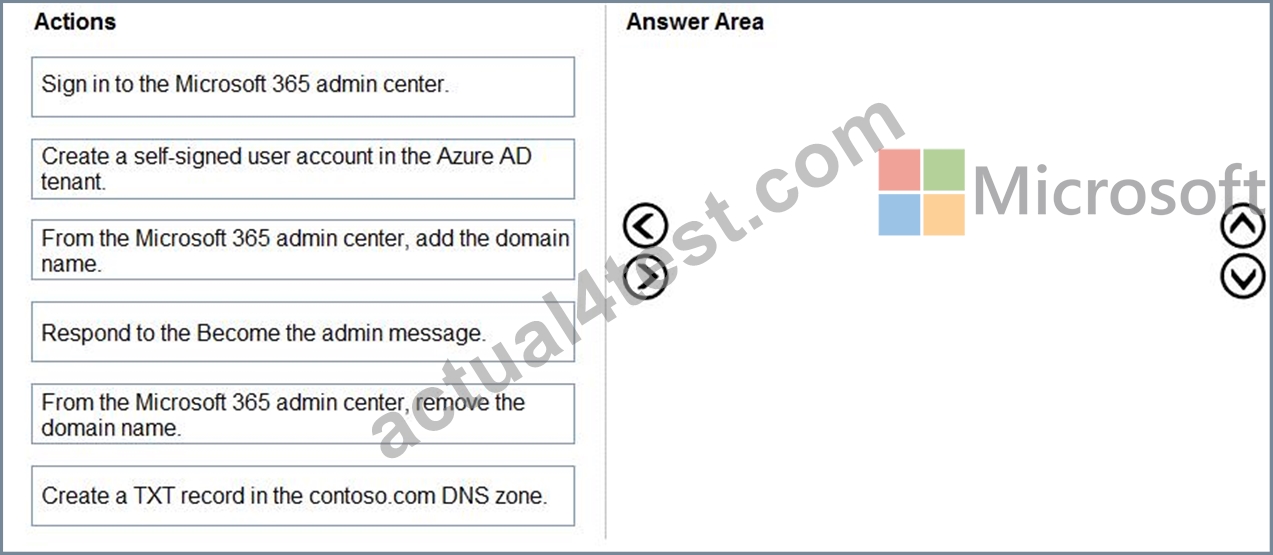
Answer:
Explanation: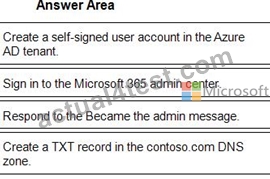
1 - Create a self-signed user account in the Azure AD tenant.
2 - Sign in to the Microsoft 365 admin center.
3 - Respond to the Became the admin message.
4 - Create a TXT record in the contoso.com DNS zone.
Reference:
https://docs.microsoft.com/en-us/azure/active-directory/enterprise-users/domains-admin-takeover
NEW QUESTION # 207
You have an Azure Active Directory (Azure Azure) tenant that contains the objects shown in the following table.
* A device named Device1
* Users named User1, User2, User3, User4, and User5
* Five groups named Group1, Group2, Group3, Ciroup4, and Group5
The groups are configured as shown in the following table.
How many licenses are used if you assign the Microsoft Office 365 Enterprise E5 license to Group1?
- A. 0
- B. 1
- C. 2
- D. 3
Answer: C
NEW QUESTION # 208
You have an Azure AD tenant that contains the groups shown in the following table.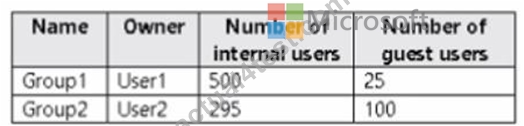
You create an access review for Group1 as shown in the following table.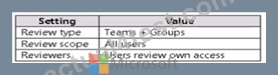
You create an access review for Group2 as shown in the following table.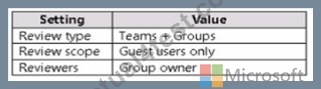
What is the minimum number of Azure AD Premium P2 licenses required for each group? To answer, select the appropriate options in the answer area. NOTE: Each correct selection is worth one point.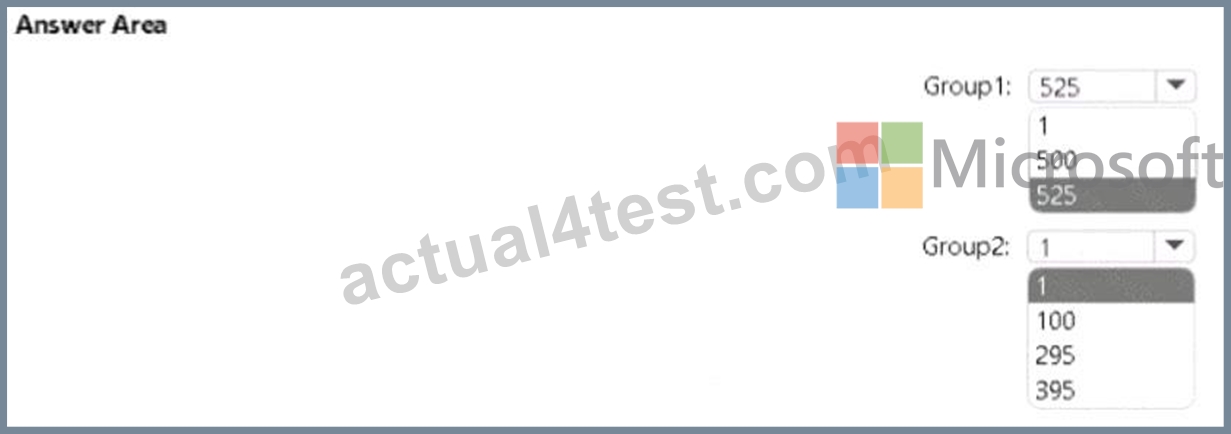
Answer:
Explanation: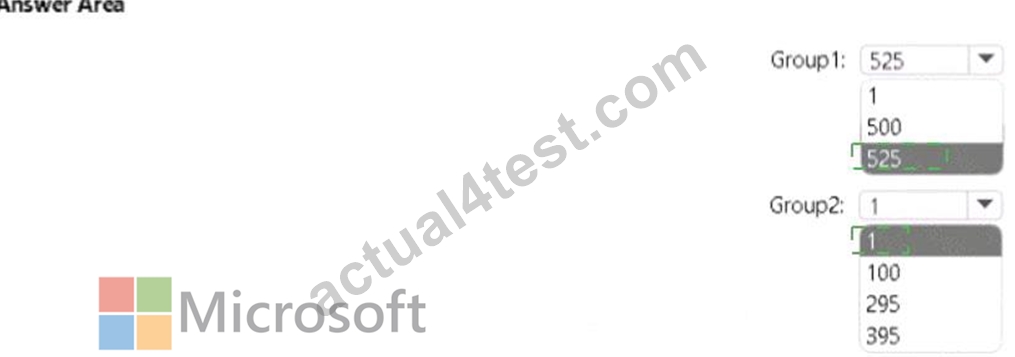
Explanation:
NEW QUESTION # 209
You have an Azure subscription named Sub1 that contains a resource group named RG1. RG1 contains an Azure Cosmos DB database named DB1 and an Azure Kubernetes Service (AKS) cluster named AKS1. AKS1 uses a managed identity.
You need to ensure that AKS1 can access DB1. The solution must meet the following requirements:
* Ensure that AKS1 uses the managed identity to access DB1.
* Follow the principle of least privilege.
Which role should you assign to the managed identity of AKS1.
- A. For R61, assign the Azure Cosmos DB Data Reader Role role.
- B. For RG1, assign the Reader role.
- C. For DB1, assign the Azure Cosmos DB Account Reader Role role.
- D. For Sub1. assign the Owner role.
Answer: A
NEW QUESTION # 210
You have a Microsoft Entra tenant that contains the users shown in the following table.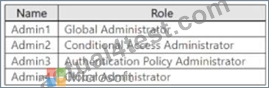
Admin4 creates a Conditional Access policy named Policy1 by using the Require multifactor authentication for Azure management template.
Which users will be required to use multi-factor authentication (MFA) the next time they sign in?
- A. Admin2 and Admin3 only
- B. Admin1 and Admin4 only
- C. Admin1, Admin2, Admin3, and Admin4
- D. Admin1, Admin2, and Admin3 only
Answer: C
NEW QUESTION # 211
You have a Microsoft 365 E5 subscription that contains three users named User1, User2, and User3 and a Microsoft SharePoint Online site named Site1.
The subscription contains the devices shown in the following table.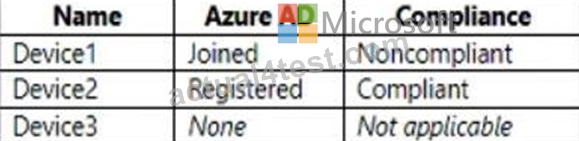
The users sign in to the devices as shown in the following table.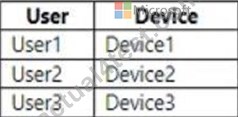
You have a Conditional Access policy that has the following settings:
- Name: CA1
- Assignments
o Users and groups: User1, User2, User3
o Cloud apps or actions: SharePoint - Site1
- Access controls
o Session: Use app enforced restrictions
From the SharePoint admin center, you configure Access control for unmanaged devices to allow limited, web-only access.
Which users will have full access to Site1?
- A. User1 only
- B. User1, User2, and User3
- C. User3only
- D. User2 only
- E. User1 and User2 only
Answer: A
Explanation:
https://learn.microsoft.com/en-us/microsoft-365/business-premium/m365bp-managed- unmanaged-devices?view=o365-worldwide&tabs=Managed
NEW QUESTION # 212
You have an Azure AD tenant.
You perform the tasks shown in the following table.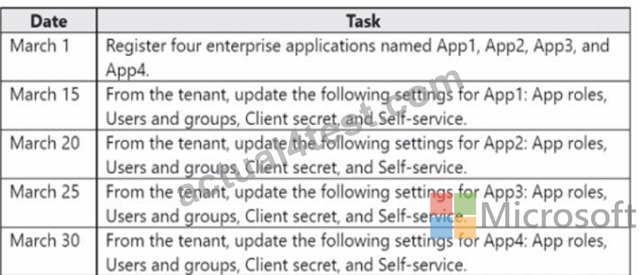
On April 5, an administrator deletes App1, App2, App3, and App4.
You need to restore the apps and the settings.
Which apps can you restore on April 16, and which settings can you restore for App4 on April 16? To answer, select the appropriate options in the answer area.
NOTE: Each correct selection is worth one point.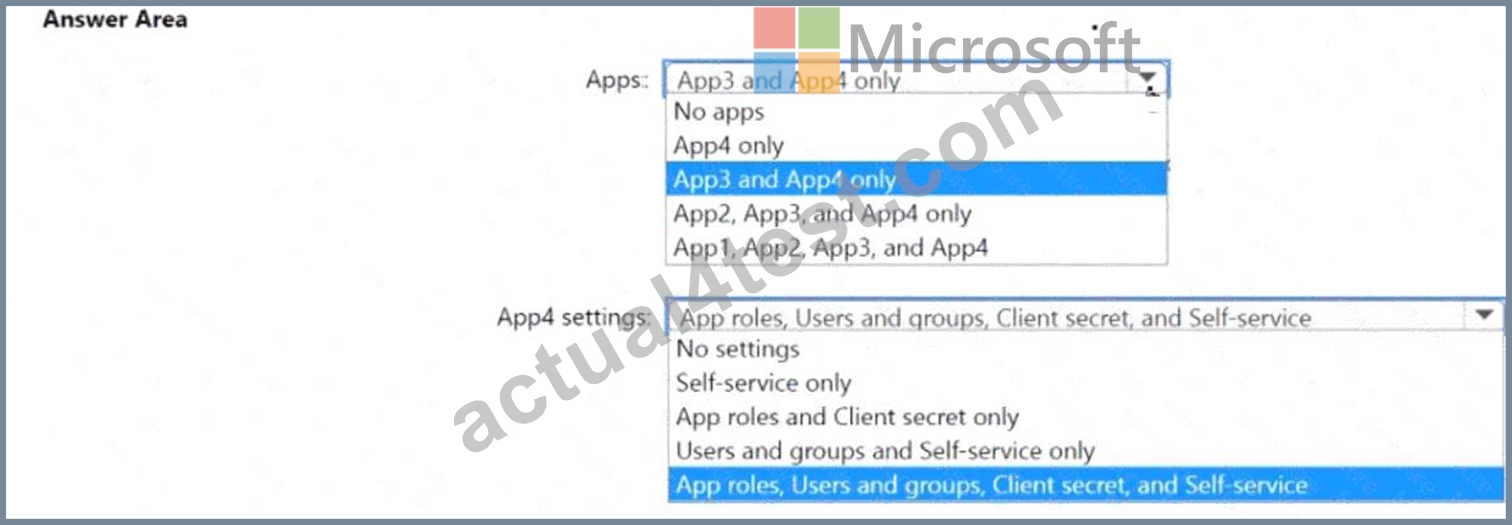
Answer:
Explanation: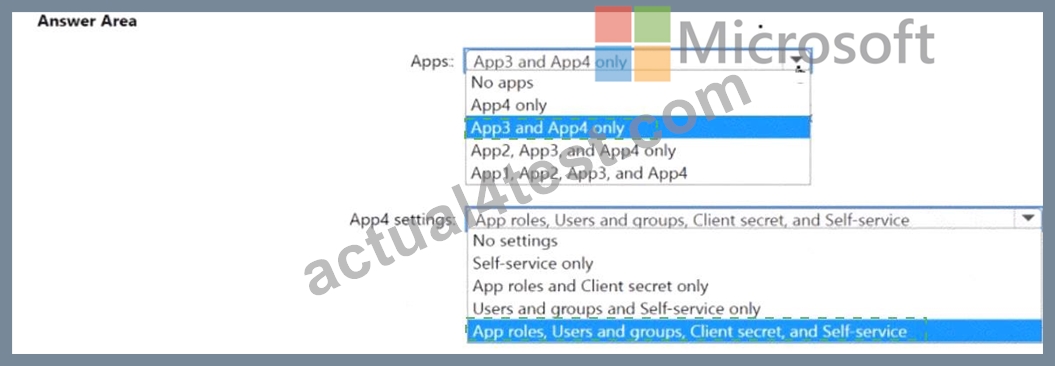
Explanation:
NEW QUESTION # 213
You have an Azure Active Directory (Azure AD) tenant that contains three users named User1, User1, and User3, You create a group named Group1. You add User2 and User3 to Group1.
You configure a role in Azure AD Privileged identity Management (PIM) as shown in the application administrator exhibit. (Click the application Administrator tab.)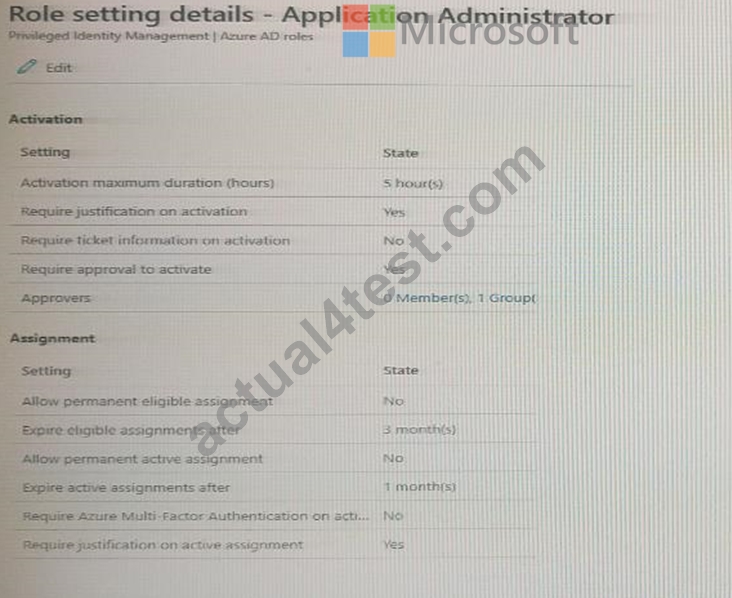
Group1 is configured as the approver for the application administrator role.
You configure User2to be eligible for the application administrator role.
For User1, you add an assignment to the Application administrator role as shown in the Assignment exhibit.
(Click Assignment tab)
For each of the following statement, select Yes if the statement is true, Otherwise, select No.
NOTE: Each correct selection is worth one point.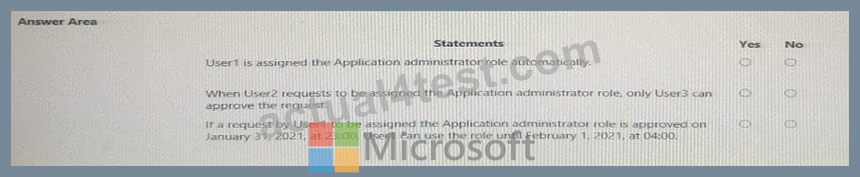
Answer:
Explanation: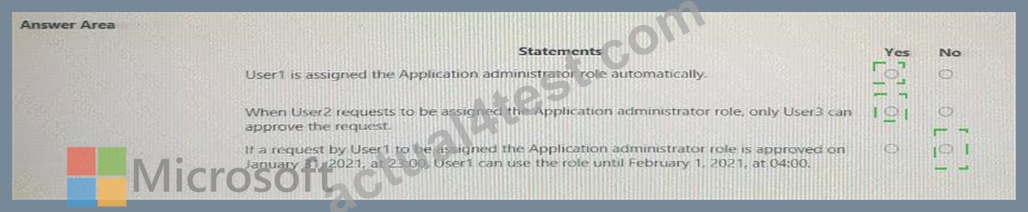
NEW QUESTION # 214
......
Microsoft SC-300 Certification Exam is designed for professionals who are responsible for managing and configuring Identity and Access solutions in Microsoft Azure. Microsoft Identity and Access Administrator certification exam validates the skills and knowledge required to design and implement secure access solutions in cloud and hybrid environments. SC-300 exam aims to test the candidates' ability to manage identity, access, governance, and compliance for Microsoft Azure applications and services.
Q&As with Explanations Verified & Correct Answers: https://www.actual4test.com/SC-300_examcollection.html
SC-300 Dumps with Free 365 Days Update Fast Exam Updates: https://drive.google.com/open?id=1-4eEHzmH8RwsfN9rUXuh2UkPZsywYmxW