


[Dec 11, 2024] CKA Exam Dumps - 100% Marks In CKA Exam!
Exam Dumps Use Real Kubernetes Administrator Dumps With 68 Questions!
NEW QUESTION # 28
Create an nginx pod and list the pod with different levels of verbosity
- A. // create a pod
kubectl run nginx --image=nginx --restart=Never --port=80
// List the pod with different verbosity
kubectl get po nginx --v=7
kubectl get po nginx --v=6
kubectl get po nginx --v=9 - B. // create a pod
kubectl run nginx --image=nginx --restart=Never --port=80
// List the pod with different verbosity
kubectl get po nginx --v=7
kubectl get po nginx --v=8
kubectl get po nginx --v=9
Answer: B
NEW QUESTION # 29
Change the label for one of the pod to env=uat and list all the pods to verify
Answer:
Explanation:
kubectl label pod/nginx-dev3 env=uat --overwrite kubectl get pods --show-labels
NEW QUESTION # 30
Create a deployment as follows:
* Name: nginx-random
* Exposed via a service nginx-random
* Ensure that the service & pod are accessible via their respective DNS records
* The container(s) within any pod(s) running as a part of this deployment should use the nginx Image Next, use the utility nslookup to look up the DNS records of the service & pod and write the output to
/opt/KUNW00601/service.dns and /opt/KUNW00601/pod.dns respectively.
Answer:
Explanation:
See the solution below.
Explanation
Solution:


NEW QUESTION # 31
Create a configmap called cfgvolume with values var1=val1,
var2=val2 and create an nginx pod with volume nginx-volume which
reads data from this configmap cfgvolume and put it on the path
/etc/cfg
- A. // first create a configmap cfgvolume
kubectl create cm cfgvolume --from-literal=var1=val1 --fromliteral=var2=val2
// verify the configmap
kubectl describe cm cfgvolume
// create the config map
kubectl create -f nginx-volume.yml
vim nginx-configmap-pod.yaml
apiVersion: v1
kind: Pod
- name: nginx-volume
configMap:
name: cfgvolume
containers:
- image: nginx
name: nginx
volumeMounts:
- name: nginx-volume
mountPath: /etc/cfg
restartPolicy: Always
k kubectl apply -f nginx-configmap-pod.yaml
/ // Verify
// exec into the pod
kubectl exec -it nginx -- /bin/sh
// check the path
cd /etc/cfg - B. // first create a configmap cfgvolume
kubectl create cm cfgvolume --from-literal=var1=val1 --fromliteral=var2=val2
// verify the configmap
kubectl describe cm cfgvolume
// create the config map
kubectl create -f nginx-volume.yml
vim nginx-configmap-pod.yaml
apiVersion: v1
kind: Pod
metadata:
labels:
run: nginx
name: nginx
spec:
volumes:
- name: nginx-volume
configMap:
name: cfgvolume
containers:
- image: nginx
name: nginx
volumeMounts:
- name: nginx-volume
mountPath: /etc/cfg
restartPolicy: Always
k kubectl apply -f nginx-configmap-pod.yaml
/ // Verify
// exec into the pod
kubectl exec -it nginx -- /bin/sh
// check the path
cd /etc/cfg
Answer: B
NEW QUESTION # 32
Ensure a single instance of pod nginx is running on each node of the Kubernetes cluster where nginx also represents the Image name which has to be used. Do not override any taints currently in place.
Use DaemonSet to complete this task and use ds-kusc00201 as DaemonSet name.
Answer:
Explanation:
See the solution below.
Explanation
solution
F:\Work\Data Entry Work\Data Entry\20200827\CKA\3 B.JPG
F:\Work\Data Entry Work\Data Entry\20200827\CKA\3 C.JPG
F:\Work\Data Entry Work\Data Entry\20200827\CKA\3 D.JPG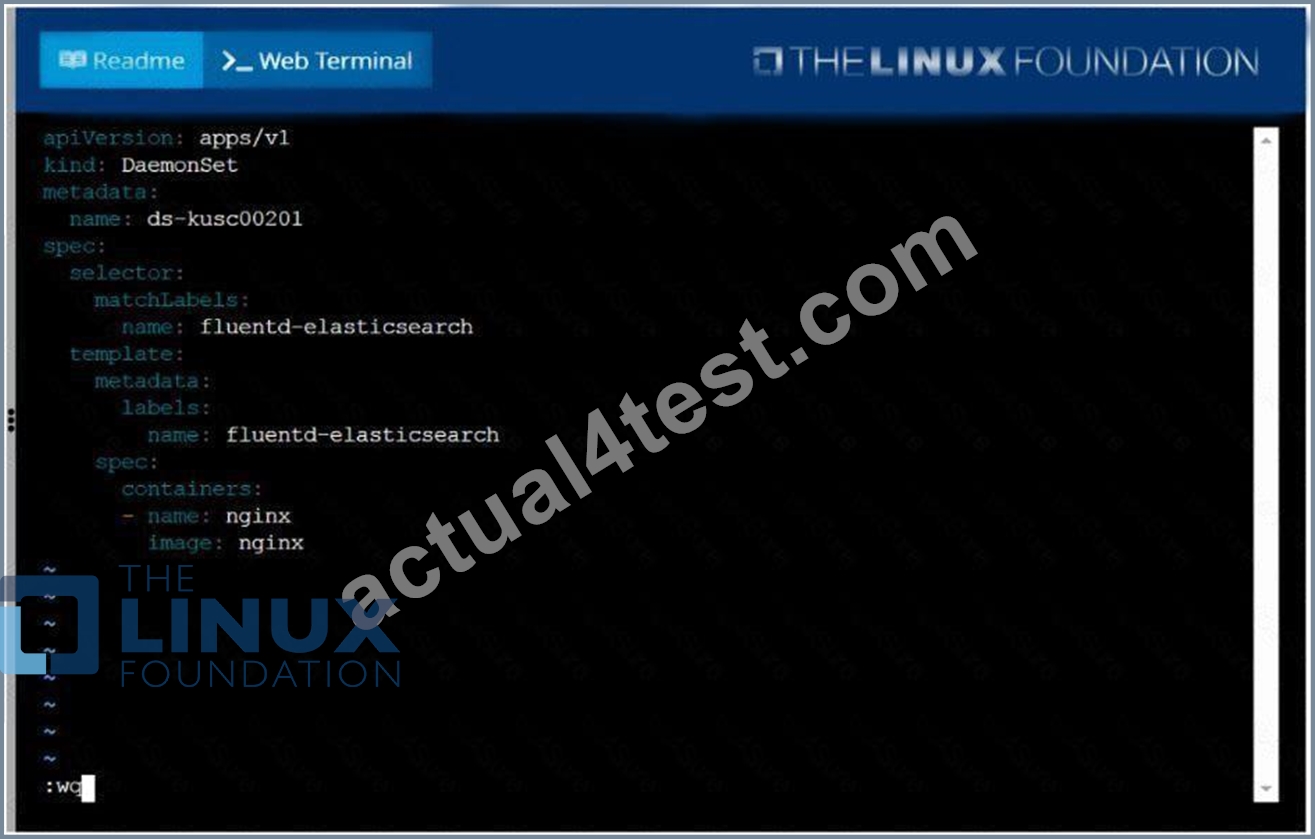
F:\Work\Data Entry Work\Data Entry\20200827\CKA\3 E.JPG
NEW QUESTION # 33
Score: 7%
Task
Given an existing Kubernetes cluster running version 1.20.0, upgrade all of the Kubernetes control plane and node components on the master node only to version 1.20.1.
Be sure to drain the master node before upgrading it and uncordon it after the upgrade.
You are also expected to upgrade kubelet and kubectl on the master node.
Answer:
Explanation:
See the solution below.
Explanation
SOLUTION:
[student@node-1] > ssh ek8s
kubectl cordon k8s-master
kubectl drain k8s-master --delete-local-data --ignore-daemonsets --force apt-get install kubeadm=1.20.1-00 kubelet=1.20.1-00 kubectl=1.20.1-00 --disableexcludes=kubernetes kubeadm upgrade apply 1.20.1 --etcd-upgrade=false systemctl daemon-reload systemctl restart kubelet kubectl uncordon k8s-master
NEW QUESTION # 34
Get all the pods with label "env"
Answer:
Explanation:
kubectl get pods -L env
NEW QUESTION # 35
List all the pods showing name and namespace with a json path expression
Answer:
Explanation:
kubectl get pods -o=jsonpath="{.items[*]['metadata.name', 'metadata.namespace']}"
NEW QUESTION # 36
Given a partially-functioning Kubernetes cluster, identify symptoms of failure on the cluster.
Determine the node, the failing service, and take actions to bring up the failed service and restore the health of the cluster. Ensure that any changes are made permanently.
You can ssh to the relevant I nodes (bk8s-master-0 or bk8s-node-0) using:
[student@node-1] $ ssh <nodename>
You can assume elevated privileges on any node in the cluster with the following command:
[student@nodename] $ | sudo -i
Answer:
Explanation:
See the solution below.
Explanation
solution


NEW QUESTION # 37
From the pod label name=cpu-utilizer, find pods running high CPU workloads and write the name of the pod consuming most CPU to the file /opt/KUTR00102/KUTR00102.txt (which already exists).
Answer:
Explanation:
See the solution below.
Explanation
solution

NEW QUESTION # 38
Get list of all pods in all namespaces and write it to file "/opt/pods-list.yaml"
Answer:
Explanation:
See the solution below.
Explanation
kubectl get po -all-namespaces > /opt/pods-list.yaml
NEW QUESTION # 39
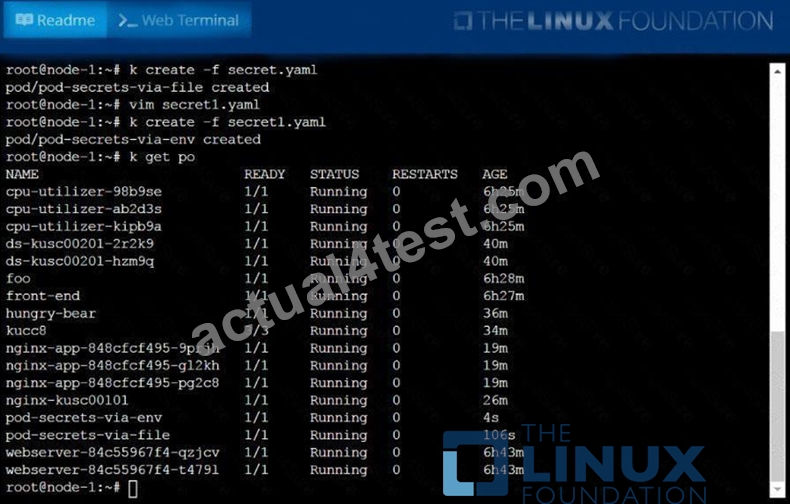
Create a Kubernetes secret as follows:
* Name: super-secret
* password: bob
Create a pod named pod-secrets-via-file, using the redis Image, which mounts a secret named super-secret at
/secrets.
Answer:
Explanation:
Create a second pod named pod-secrets-via-env, using the redis Image, which exports password as CONFIDENTIAL See the solution below.
Explanation
solution

NEW QUESTION # 40
Create a busybox pod which executes this command sleep 3600 with the service account admin and verify
- A. kubectl run busybox --image=busybox --restart=Always --dry-run
-o yaml -- /bin/sh -c "sleep 3600" > busybox.yml
// Edit busybox.yaml file
apiVersion: v1
kind: Pod
metadata:
creationTimestamp: null
labels:
run: busybox
name: busybox
spec:
serviceAccountName: admin
containers:
- args:
- /bin/sh
- -c
- sleep 3800
image: busybox
name: busybox
restartPolicy: Always
// verify
K kubectl describe po busybox - B. kubectl run busybox --image=busybox --restart=Always --dry-run
-o yaml -- /bin/sh -c "sleep 3600" > busybox.yml
// Edit busybox.yaml file
apiVersion: v1
kind: Pod
metadata:
creationTimestamp: null
labels:
run: busybox
name: busybox
spec:
serviceAccountName: admin
containers:
- args:
- /bin/sh
- -c
- sleep 3600
image: busybox
name: busybox
restartPolicy: Always
// verify
K kubectl describe po busybox
Answer: B
NEW QUESTION # 41
Get the deployment rollout status
Answer:
Explanation:
kubectl rollout status deploy webapp
NEW QUESTION # 42
For this item, you will have to ssh to the nodes ik8s-master-0 and ik8s-node-0 and complete all tasks on these nodes. Ensure that you return to the base node (hostname: node-1) when you have completed this item.
Context
As an administrator of a small development team, you have been asked to set up a Kubernetes cluster to test the viability of a new application.
Task You must use kubeadm to perform this task. Any kubeadm invocations will require the use of the --ignore-preflight-errors=all option.
Configure the node ik8s-master-O as a master node. .
Join the node ik8s-node-o to the cluster.
Answer:
Explanation:
solution
You must use the kubeadm configuration file located at /etc/kubeadm.conf when initializing your cluster.
You may use any CNI plugin to complete this task, but if you don't have your favourite CNI plugin's manifest URL at hand, Calico is one popular option: https://docs.projectcalico.org/v3.14/manifests/calico.yaml Docker is already installed on both nodes and apt has been configured so that you can install the required tools.
NEW QUESTION # 43
Score: 4%
Task
Scale the deployment presentation to 6 pods.
Answer:
Explanation:
Solution:
kubectl get deployment
kubectl scale deployment.apps/presentation --replicas=6
NEW QUESTION # 44
Get list of all the nodes with labels
Answer:
Explanation:
kubectl get nodes --show-labels
NEW QUESTION # 45
Score: 4%
Task
Set the node named ek8s-node-1 as unavailable and reschedule all the pods running on it.
Answer:
Explanation:
See the solution below.
Explanation
SOLUTION:
[student@node-1] > ssh ek8s
kubectl cordon ek8s-node-1
kubectl drain ek8s-node-1 --delete-local-data --ignore-daemonsets --force
NEW QUESTION # 46
Create a nginx pod that will be deployed to node with the label
"gpu=true"
- A. kubectl run nginx --image=nginx --restart=Always --dry-run -o
yaml > nodeselector-pod.yaml
// add the nodeSelector like below and create the pod
kubectl apply -f nodeselector-pod.yaml
vim nodeselector-pod.yaml
apiVersion: v1
kind: Pod
metadata:
name: nginx
spec:
nodeSelector:
gpu: true
containers:
- image: nginx
name: nginx
restartPolicy: Always
kubectl apply -f nodeselector-pod.yaml
//Verify
kubectl get no -show-labels
kubectl get po
kubectl describe po nginx | grep Node-Selectors - B. kubectl run nginx --image=nginx --restart=Always --dry-run -o
yaml > nodeselector-pod.yaml
// add the nodeSelector like below and create the pod
kubectl apply -f nodeselector-pod.yaml
vim nodeselector-pod.yaml
apiVersion: v1
kind: Pod
metadata:
name: nginx
spec:
nodeSelector:
gpu: true
yaml
//Verify
kubectl get no -show-labels
kubectl get po
kubectl describe po nginx | grep Node-Selectors
Answer: A
NEW QUESTION # 47
Add a taint to node "worker-2" with effect as "NoSchedule" and
list the node with taint effect as "NoSchedule"
- A. // Add taint to node "worker-2"
kubectl taint nodes worker-2 key=value:NoSchedule
.items[*]}{.metadata.name} {.spec.taints[?(
@.effect=='NoSchedule' )].effect}{\"\n\"}{end}" | awk 'NF==2
{print $0}' - B. // Add taint to node "worker-2"
kubectl taint nodes worker-2 key=value:NoSchedule
// Verify
// Using "custom-coloumns" , you can customize which coloumn to
be printed
kubectl get nodes -o customcolumns=NAME:.metadata.name,TAINTS:.spec.taints --no-headers
// Using jsonpath
kubectl get nodes -o jsonpath="{range
.items[*]}{.metadata.name} {.spec.taints[?(
@.effect=='NoSchedule' )].effect}{\"\n\"}{end}" | awk 'NF==2
{print $0}'
Answer: B
NEW QUESTION # 48
......
Pass Your CKA Exam Easily With 100% Exam Passing Guarantee: https://www.actual4test.com/CKA_examcollection.html
CKA Dumps are Available for Instant Access: https://drive.google.com/open?id=1OVwxodqeXmv_-467dG2-mAi9xs0wgcki