


MD-101 Exam Dumps, MD-101 Practice Test Questions
PDF (New 2023) Actual Microsoft MD-101 Exam Questions
NEW QUESTION 135
You manage 1,000 computers that run Windows 10. All the computers are enrolled in Microsoft Intune. You manage the servicing channel settings of the computers by using Intune.
You need to review the servicing status of a computer.
What should you do?
- A. From Software updates, view the audit logs.
- B. From Device configuration - Profiles, view the device status.
- C. From Software updates, view the Per update ring deployment state.
- D. From Device compliance, view the device compliance.
Answer: C
Explanation:
Explanation/Reference:
References:
https://docs.microsoft.com/en-us/intune/windows-update-compliance-reports
NEW QUESTION 136
You have groups that use the Dynamic Device membership type as shown in the following table.
You are deploying Microsoft 365 apps.
You have devices enrolled in Microsoft Intune as shown in the following table.
In the Microsoft Endpoint Manager admin center, you create a Microsoft 365 Apps app as shown in the exhibit. (Click the Exhibit tab.)
For each of the following statements, select Yes if the statement is true. Otherwise, select No.
NOTE: Each correct selection is worth one point.
Answer:
Explanation:
Reference:
https://docs.microsoft.com/en-us/mem/intune/apps/apps-add-office365
https://docs.microsoft.com/en-us/mem/intune/apps/apps-deploy
https://docs.microsoft.com/en-us/mem/intune/apps/apps-add
NEW QUESTION 137
You have a Microsoft Intune subscription.
You create the Windows Autopilot deployment profile-shown in the following exhibit.
Use the drop-down menus to select the answer choice that completes each statement based on the information presented in the graphic.
NOTE: Each correct selection is worth one point.
Answer:
Explanation:
Explanation
References:
https://docs.microsoft.com/en-us/windows/deployment/windows-autopilot/user-driven
NEW QUESTION 138
You have a Microsoft 365 tenant that uses Microsoft Intune to manage the devices shown in the following table.
You need to deploy a compliance solution that meets the following requirements:
Marks the devices as Not Compliant if they do not meet compliance policies Remotely locks noncompliant devices What is the minimum number of compliance policies required, and which devices support the remote lock action? To answer, select the appropriate options in the answer area.
NOTE: Each correct selection is worth one point.
Answer:
Explanation:
Reference:
https://docs.microsoft.com/en-us/mem/intune/protect/device-compliance-get-started
https://docs.microsoft.com/en-us/mem/intune/protect/actions-for-noncompliance
NEW QUESTION 139
You upgrade three computers from Windows 8.1 to Windows 10 as shown in the following table.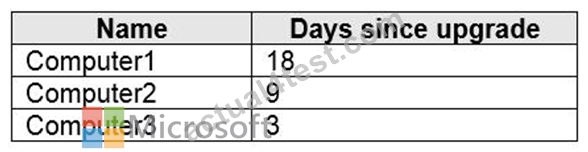
The in-place upgrade settings used to perform the upgrade are shown in the following table.
After the upgrade, you perform the following actions on each computer:
For each of the following statements, select Yes if the statement is true. Otherwise, select No.
NOTE: Each correct selection is worth one point.
Answer:
Explanation:
Reference:
https://www.infoworld.com/article/3033806/how-to-roll-back-your-windows-10-upgrade.html
NEW QUESTION 140
Your network contains an on-premises Active Directory domain named contoso.com that syncs to Azure Active Directory (Azure AD).
A user named User1 uses the domain-joined devices shown in the following table.
In the Azure Active Directory admin center, you assign a Windows 10 Enterprise E5 license to User1.
You need to identify what will occur when User1 next signs in to the devices.
What should you identify for each device? To answer, select the appropriate options in the answer area.
NOTE: Each correct selection is worth one point.
Answer:
Explanation:
Reference:
https://docs.microsoft.com/en-us/windows/deployment/windows-10-subscription-activation
NEW QUESTION 141
You have a computer named Computer1 that runs Windows 10. Computer is used by a user named User1.
You need to ensure that when User1 opens websites from untrusted locations by using Microsoft Edge, Microsoft Edge runs in isolated container.
What should you do first?
- A. From Windows Security, configure the Device security settings.
- B. From Windows Features, turn on Windows Defender Application Guard.
- C. From Windows Security, configure the Virus & threat protection settings.
- D. From Windows Features, turn on Hyper-V Platform.
Answer: B
Explanation:
Reference:
https://docs.microsoft.com/en-us/windows/security/threat-protection/windows-defender-application-guard/wd-app-guard-overview
https://docs.microsoft.com/en-us/windows/security/threat-protection/windows-defender-application-guard/install-wd-app-guard
NEW QUESTION 142
You have 200 computers that run Windows 10.
You need to create a provisioning package to configure the following tasks:
* Remove the Microsoft News and the Xbox Microsoft Store apps.
* Add a VPN connection to the corporate network.
Which two customizations should you configure? To answer, select the appropriate customizations in the answer area.
NOTE: Each correct selection is worth one point.
Answer:
Explanation:
Explanation:
References:
https://docs.microsoft.com/en-us/windows/configuration/wcd/wcd-connectivityprofiles
https://docs.microsoft.com/en-us/windows/client-management/mdm/policy-configuration-service-provider#applicationmanagement-applicationrestrictions
https://docs.microsoft.com/en-us/windows/configuration/wcd/wcd-policies
NEW QUESTION 143
You have a Microsoft Azure Active Directory (Azure AD) tenant named contoso.com. All Windows 10 devices are enrolled in Microsoft Intune.
You configure the following settings in Windows Information Protection (WIP):
Protected apps: App1
Exempt apps: App2
Windows Information Protection mode: Silent
App1, App2, and App3 use the same file format.
You create a file named File1 in App1.
You need to identify which apps can open File1.
What apps should you identify? To answer, select the appropriate options in the answer area, NOTE: Each correct selection is worth one point.
Answer:
Explanation:
Reference:
https://docs.microsoft.com/en-us/windows/security/information-protection/windows-information-protection/create-wip-policy-using-intune
https://docs.microsoft.com/en-us/windows/security/information-protection/windows-information-protection/create-wip-policy-using-intune#exempt-apps-from-wip-restrictions
NEW QUESTION 144
Your network contains an Active Directory domain named contoso.com that syncs to Azure Active Directory (Azure AD).
The Active Directory domain contains 200 computers that run Windows 10. The computers are managed by using Microsoft System Center Configuration Manager (Current Branch).
You need to pilot co-management for only five of the computers.
What should you create first?
- A. a dynamic device group in Azure AD
- B. an Intune Connector for Active Directory
- C. a device collection in Configuration Manager
- D. a domain local distribution group in Active Directory
Answer: C
Explanation:
Explanation
The Pilot Intune setting switches the associated workload only for the devices in the pilot collection.
Note: When you enable co-management, you'll assign a collection as a Pilot group. This is a group that contains a small number of clients to test your co-management configurations. We recommend you create a suitable collection before you start the procedure. Then you can select that collection without exiting the procedure to do so.
References:
https://docs.microsoft.com/en-us/configmgr/comanage/tutorial-co-manage-new-devices
NEW QUESTION 145
What is the maximum number of devices that User1 and User2 can enroll in Intune? To answer, select the appropriate options in the answer area.
NOTE: Each correct selection is worth one point.
Answer:
Explanation:
NEW QUESTION 146
You have an Azure Active Directory (Azure AD) tenant named adatum.com that contains two computers named Computer1 and Computer2. The computers run Windows 10 and are members of a group named GroupA.
The tenant contains a user named User1 that is a member of a group named Group 1.
You need to ensure that if User1 changes the desktop background on Computer1, the new desktop background will appear when User1 signs in to Computer2.
What should you do?
- A. Create a device configuration profile for Windows 10 and configure the Shared multi-user device settings. Assign the profile to Group 1.
- B. Create a device configuration profile for Windows 10 and configure the Shared multi-user device settings. Assign the profile to GroupA.
- C. From the Azure Active Directory admin center, enable Enterprise State Roaming for GroupA.
- D. From the Azure Active Directory admin center, enable Enterprise State Roaming for Group1.
Answer: A
NEW QUESTION 147
You have unrooted devices enrolled in Microsoft Intune as shown in the following table.
The devices are members of a group named Group1.
In Intune, you create a device compliance location that has the following configurations:
* Name: Network1
* IPv4 range: 192.168.0.0/16
In Intune, you create a device compliance policy for the Android platform. The policy has following configurations:
* Name: Policy1
* Device health: Rooted devices: Block
* Locations: Location: Network1
* Mark device noncompliant: Immediately
* Assigned: Group1
In Intune device compliance policy has the following configurations:
* Mark devices with no compliance policy assigned as: Compliant
* Enhanced jailbreak detection: Enabled
* Compliance status validity period (days): 20
For each of the following statements, select Yes if the statement is true. Otherwise, select No.
NOTE: Each correct selection is worth one point.
Answer:
Explanation:
Reference:
https://docs.microsoft.com/en-us/intune/device-compliance-get-started
NEW QUESTION 148
You have 100 Windows 10 devices enrolled in Microsoft Intune.
You need to configure the devices to retrieve Windows updates from the internet and from other computers on a local network.
Which Delivery Optimization setting should you configure, and which type of Intune object should you create? To answer, select the appropriate options in the answer area.
NOTE: Each correct selection is worth one point.
Answer:
Explanation:
Reference:
https://docs.microsoft.com/en-us/mem/intune/configuration/delivery-optimization-settings
https://docs.microsoft.com/en-us/mem/intune/configuration/delivery-optimization-windows
NEW QUESTION 149
Your network contains an Active Directory domain named contoso.com. The domain contains 500 computers that run Windows 7. Some of the computers are used by multiple users.
You plan to refresh the operating system of the computers to Windows 10.
You need to retain the personalization settings to applications before you refresh the computers. The solution must minimize network bandwidth and network storage space.
Which command should you run on the computer? To answer, select the appropriate options in the answer area.
NOTE: Each correct selection is worth one point.
Answer:
Explanation:
Reference:
https://docs.microsoft.com/en-us/windows/deployment/usmt/usmt-scanstate-syntax#how-to-use-ui-and-ue
NEW QUESTION 150
You have 1,000 computers that run Windows 10 and are members of an Active Directory domain.
You create a workspace in Microsoft Azure Log Analytics.
You need to capture the event logs from the computers to Azure.
What should you do? To answer, select the appropriate options in the answer area.
NOTE: Each correct selection is worth one point.
Answer:
Explanation:
Reference:
https://docs.microsoft.com/en-us/azure/azure-monitor/platform/agent-windows
NEW QUESTION 151
You have 1,000 computers that run Windows 10 and are members of an Active Directory domain.
You create a workspace in Microsoft Azure Log Analytics.
You need to capture the event logs from the computers to Azure.
What should you do? To answer, select the appropriate options in the answer area.
NOTE: Each correct selection is worth one point.
Answer:
Explanation:
Reference:
https://docs.microsoft.com/en-us/azure/azure-monitor/platform/agent-windows
NEW QUESTION 152
You have 100 Windows 10 devices that are managed by using Microsoft Endpoint Manager.
You plan to sideload an app to the devices.
You need to configure Microsoft Endpoint Manager to enable sideloading.
Which device profile type and setting should you configure? To answer, select the appropriate options in the answer area.
NOTE: Each correct selection is worth one point.
Answer:
Explanation:
Reference:
https://docs.microsoft.com/en-us/mem/intune/configuration/device-restrictions-windows-10
NEW QUESTION 153
You have 100 computers that run Windows 10. The computers are joined to Microsoft Azure Active Directory (Azure AD) and enrolled in Microsoft Intune.
You need to configure the following device restrictions:
* Block users from browsing to suspicious websites.
* Scan all scripts loaded into Microsoft Edge.
Which two settings should you configure in Device restrictions? To answer, select the appropriate settings in the answer area.
NOTE: Each correct selection is worth one point.
Answer:
Explanation:
Reference:
https://docs.microsoft.com/en-us/windows/security/threat-protection/windows-defender-smartscreen/windows-defender-smartscreen-overview
NEW QUESTION 154
Your
company has an internal portal that uses a URL of http://contoso.com.
The network contains computers that run Windows 10. The default browser on all the computers is Microsoft Edge.
You need to ensure that all users only use Internet Explorer to connect to the internal portal. The solution must ensure that Microsoft Edge can be used to connect to all other websites.
What should you do from each computer?
- A. From Microsoft Edge, configure the Advanced Site Settings
- B. From the local policy, configure Enterprise Mode
- C. From the Settings app, configure the default web browser settings
- D. From Internet Explorer, configure the Compatibility View settings
Answer: B
Explanation:
Reference:
https://docs.microsoft.com/en-us/microsoft-edge/deploy/emie-to-improve-compatibility
NEW QUESTION 155
Note: This question is part of a series of questions that present the same scenario. Each question in the series contains a unique solution that might meet the stated goals. Some question sets might have more than one correct solution, while others might not have a correct solution.
After you answer a question in this section, you will NOT be able to return to it. As a result, these questions will not appear in the review screen.
Your company uses Windows Update for Business.
The research department has several computers that have specialized hardware and software installed.
You need to prevent the video drivers from being updated automatically by using Windows Update.
Solution: From the Settings app, you clear the Give me updates for other Microsoft products when I update Windows check box.
Does this meet the goal?
- A. No
- B. Yes
Answer: A
Explanation:
Explanation
References:
https://www.stigviewer.com/stig/microsoft_windows_server_2012_member_server/2013-07-25/finding/WN12-C
NEW QUESTION 156
You have a Microsoft Intune subscription.
You create the Windows Autopilot deployment profile-shown in the following exhibit.
Use the drop-down menus to select the answer choice that completes each statement based on the information presented in the graphic.
NOTE: Each correct selection is worth one point.
Answer:
Explanation:
Explanation:
References:
https://docs.microsoft.com/en-us/windows/deployment/windows-autopilot/user-driven
NEW QUESTION 157
You have computers that run Windows 10 and are configured by using Windows AutoPilot.
A user performs the following tasks on a computer named Computer1:
Creates a VPN connection to the corporate network
Installs a Microsoft Store app named App1
Connects to a Wi-Fi network
You perform a Windows AutoPilot Reset on Computer1.
What will be the state of the computer when the user signs in? To answer, select the appropriate options in the answer area.
NOTE: Each correct selection is worth one point.
Answer:
Explanation:
Reference:
https://docs.microsoft.com/en-us/windows/deployment/windows-autopilot/windows-autopilot-reset
NEW QUESTION 158
You have a Microsoft Intune subscription.
You create the Windows Autopilot deployment profile-shown in the following exhibit.
Use the drop-down menus to select the answer choice that completes each statement based on the information presented in the graphic.
NOTE: Each correct selection is worth one point.
Answer:
Explanation:
Explanation
References:
https://docs.microsoft.com/en-us/windows/deployment/windows-autopilot/user-driven
NEW QUESTION 159
Your company has 1,000 Windows 10 devices that are enrolled in Windows Analytics.
You need to view the following information:
* The number of devices that are vulnerable to Spectre and Meltdown vulnerabilities
* The number of devices that have Windows Defender real-time protection turned off Which Windows Analytics solutions should you use? To answer, select the appropriate options in the answer area.
NOTE: Each correct selection is worth one point.
Answer:
Explanation:
Explanation:
Note: Windows Analytics is now known as Desktop Analytics and Windows Defender is now known as Microsoft Defender Antivirus
NEW QUESTION 160
......
Updated Feb-2023 Pass MD-101 Exam - Real Practice Test Questions: https://www.actual4test.com/MD-101_examcollection.html
Dumps Moneyack Guarantee - MD-101 Dumps UpTo 90% Off: https://drive.google.com/open?id=1gvFq4G6dMrQ7CIHvTbFQPliFGuChpAX9