


MS-700 Questions PDF [2026] Use Valid New dump to Clear Exam
Passing Microsoft MS-700 Exam Using 2026 Practice Tests
Career Path and Salary
The Microsoft MS-700 is the best choice for you if you want to know everything about Microsoft Teams and become a certified team administrator. So, if you are someone who is struggling in a career, you should definitely think about going for this path to get the Microsoft certificate. It will be accepted all over the world and open many new opportunities for you, so don't miss this chance. Glassdoor.com estimates the salary of team administrators to be around $49k annually. Enhancing yourself in the area of your skills will go further in building you careerwise. So, you can step into an expert certificate such as the Microsoft Certified: Enterprise Administrator Expert which has the Microsoft Certified: Teams Administrator Associate listed as a prerequisite.
NEW QUESTION # 177
You have a Microsoft 365 subscription that uses Microsoft Teams. You need to create the resource accounts shown in the following table.
Which resource accounts require licenses, and which type of license is required? To answer, select the appropriate options in the answer area. NOTE: Each correct selection is worth one point.
Answer:
Explanation:
Explanation:
NEW QUESTION # 178
Hotspot Question
Your company uses Teams.
You have the following teams:
- Accounting
- Project Management
- Information Technology
You plan to create new channels.
You need to recommend channel types to meet the following requirements:
- Only the managers on the Accounting team must have access to
collaborate on annual reports.
- The Project Management team must be able to collaborate with the
Information Technology team on a network refresh project.
Which channel type should you recommend for each team? To answer, select the appropriate options in the answer area.
NOTE: Each correct selection is worth one point.
Answer:
Explanation:
Explanation:
https://learn.microsoft.com/en-us/microsoftteams/shared-channels
NEW QUESTION # 179
What should you recommend to meet the Microsoft Teams requirements for guest access?
- A. From the Azure Active Directory admin center, modify the External collaboration settings to include
fabrikam.com only. - B. From the Microsoft Teams admin center, turn off org-wide guest access and manually add guest users from fabrikam.com to teams.
- C. From the Microsoft 365 admin center, modify the Office 365 groups settings.
- D. From the External access settings in the Microsoft Teams admin center, add fabrikam.com to the Allowed list of domains.
Answer: A
Explanation:
https://docs.microsoft.com/en-us/azure/active-directory/b2b/delegate-invitations
https://docs.microsoft.com/en-us/microsoftteams/manage-external-access https://docs.microsoft.com/en-us/azure/active-directory/b2b/allow-deny-list
NEW QUESTION # 180
You have a Microsoft 365 E5 subscription.
You plan to enable Phone System for Microsoft Teams.
You need to configure the following:
* On-hold music
* A greeting message
* Call forwarding and simultaneous ringing to external phone numbers
Which two settings should you configure? To answer, select the appropriate settings in the answer area.
NOTE: Each correct selection is worth one point
Answer:
Explanation:
Explanation:
NEW QUESTION # 181
What should you recommend to meet the Microsoft Teams requirements for guest access?
- A. From the External access settings in the Microsoft Teams admin center, add fabrikam.com to the Allowed list of domains.
- B. From the Azure Active Directory admin center, modify the External collaboration settings to include fabrikam.com only.
- C. From the Microsoft Teams admin center, turn off org-wide guest access and manually add guest users from fabrikam.com to teams.
- D. From the Microsoft 365 admin center, modify the Office 365 groups settings.
Answer: A
Explanation:
Reference:
https://docs.microsoft.com/en-us/microsoftteams/manage-external-access
NEW QUESTION # 182
You have a Microsoft 365 E5 subscription that includes Teams.
You need to identify app data for a specific date and time range for the following:
* Teams apps that were installed on or removed from a Teams client
* Teams apps that were added to or removed from the Microsoft Teams app catalog What should you do?
- A. From the Microsoft Teams admin center, review Teams usage reports.
- B. From Microsoft Teams apps in the Microsoft 365 admin center, review the App usage report.
- C. From Compliance Manager, search the audit log.
- D. From the Microsoft Entra admin center, search the audit log.
Answer: C
NEW QUESTION # 183
Your company has a Microsoft 365 subscription that uses Phone System.
You need to configure the environment to the meet the following requirements:
Only users in the company's sales department must have Call forwarding and simultaneous ringing to external phone numbers set to Off.
Only users in the marketing department must have Inbound calls can be routed to call groups set to Off.
All outbound calls to the PSTN must use the auto attendant number as the caller ID.
What is the minimum number of policies that should be created? To answer, select the appropriate options in the answer area.
NOTE: Each correct selection is worth one point.
Answer:
Explanation:
NEW QUESTION # 184
Which feature protects the data in Microsoft Teams?
- A. Safe Links
- B. Advanced Threat Protection (ATP)
- C. Conditional access policy (CA)
- D. Safe Attachmentsright
Answer: D
Explanation:
Safe Attachments for SharePoint, OneDrive, and Microsoft Teams in Microsoft Defender for Office 365 provide an additional layer of protection for files. It also detects and blocks existing files that are identified as malicious in Teams.
Option A is incorrect: Advanced Threat Protection (ATP) is for Microsoft Teams along with SharePoint and OneDrive for business applications that integrate with Team's content management.
Option B is incorrect: Safe links currently are not available for Microsoft Teams, but those can be obtained with ATP safe links plans.
Option C is correct: Safe attachment protection is available to SharePoint, OneDrive, and Microsoft Teams. Safe attachments are a feature designed to improve user security by checking for and detecting malicious attachments by creating policies by global or Security Administrators for tenants.
Option D is incorrect: Conditional access policy (CA) is a policy that controls the user's activity and actions that they can do and cannot do in and outside the organization network.
Reference:
https://docs.microsoft.com/en-us/microsoft-365/security/office-365-security/mdo-for-spo-odb-and- teams?view=o365-worldwide
NEW QUESTION # 185
During the pilot project, you review the global policies in the Microsoft Teams admin center.
Contoso has a global meeting policy configured as shown in the following exhibit.
Contoso has a global live events policy configured as shown in the following exhibit.
For each of the following statements, select Yes if the statement is true. Otherwise, select No.
NOTE: Each correct selection is worth one point.
Answer:
Explanation:
Explanation
NEW QUESTION # 186
Your company has a Microsoft 365 subscription. The subscription contains 200 Microsoft Teams users and a team named IT Support that has 50 members.
You need to ensure that the caller ID for outbound PSTN calls from IT Support is the phone number of the company's IT helpdesk. The solution must minimize administrative effort.
Which two tools should you include in the solution? Each correct answer presents part of the solution.
NOTE: Each correct selection is worth one point.
- A. the Call Quality Dashboard (CQD)
- B. the Windows PowerShell module for Microsoft Skype for Business Online
- C. the Azure Active Directory (Azure AD) PowerShell for Graph module
- D. the Microsoft Teams PowerShell module
- E. the Skype for Business admin center
Answer: D,E
Explanation:
https://docs.microsoft.com/en-us/powershell/module/skype/new-cscallinglineidentity?view=skype- ps
https://docs.microsoft.com/en-us/microsoftteams/assign-policies#assign-a-policy-to-a-group
NEW QUESTION # 187
Adele Vance Is a member of your company s technology adoption team.
You need to provide only Adele with the ability to turn on and off Teams preview features.
Answer:
Explanation:
See the solution in the explanation below:
Explanation
To provide only Adele Vance with the ability to turn on and off Teams preview features, you need to create and assign a custom update policy for her. Here are the steps to do so:
Sign in to the Microsoft Teams admin center with your Microsoft 365 username and password1.
In the left navigation, go to Teams > Teams Update policies.
Select Add to create a new policy or select an existing policy to open Update policy.
Name the update policy, add a description, and select Enabled from the drop-down menu for Allow public preview. This option enables Teams Public Preview regardless of whether a user is enrolled in Office Current Channel (Preview). The end user must also opt in to Teams public preview in their Teams app2.
Click Save and then Close.
In the left navigation, go to Users and then search for Adele Vance from the list of users.
In the user details page, go to Policies and then click Edit next to Assigned policies.
In the Assigned policies pane, under Update policy, select the policy that you created or modified in step
4 from the drop-down menu.
Click Apply and then Close.
Now, Adele Vance can turn on and off Teams preview features by following these steps in her Teams app3:
Select the three dots to the left of your profile to display the Teams menu.
Select About > Public preview.
Select Switch to Public preview or Switch back to standard version.
NEW QUESTION # 188
Your company has a Microsoft Office 365 subscription.
The company has the administrators and the security requirements shown in the following table.
You need to assign a role to each administrator to ensure that the administrators can meet the security requirements by using the Microsoft Teams admin center. The solution must use the principle of least privilege.
Which role should you assign to each administrator? To answer, drag the appropriate roles to the correct users. Each role may be used once, more than once, or not at all. You may need to drag the split bar between panes or scroll to view content.
NOTE: Each correct selection is worth one point.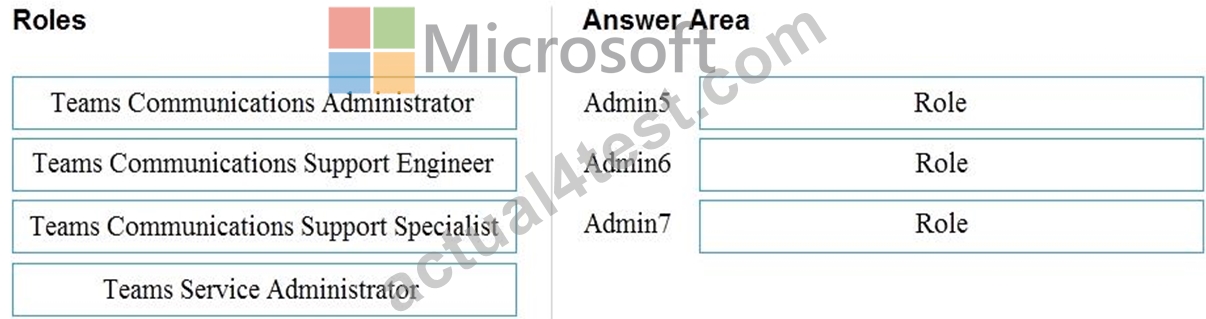
Answer:
Explanation:
Reference:
https://docs.microsoft.com/en-us/microsoftteams/using-admin-roles
NEW QUESTION # 189
You have a Microsoft 365 subscription that uses Microsoft Teams.
You need to identify the following:
The number of guest users on a team named Customer Support.
Users that use the Teams mobile app for iOS.
Which reports should you run? To answer, drag the appropriate reports to the correct requirements. Each report may be used once, more than once, or not at all.
drag the split bar between panes or scroll to view content.
Answer:
Explanation:
Explanation:
App usage
Team Device usage
NEW QUESTION # 190
You have a Microsoft 365 tenant that uses Microsoft Skype for Business on-premises.
You plan to upgrade to Microsoft Teams in stages based on groups. The features required by each group are shown in the following table.
How should you configure the upgrade policy for the groups? To answer, select the appropriate options in the answer area.
Answer:
Explanation:
Explanation
Reference:
https://docs.microsoft.com/en-us/microsoftteams/migration-interop-guidance-for-teams-with-skype
NEW QUESTION # 191
Your company has a Microsoft 365 subscription.
You need to configure Microsoft Teams to meet the requirements shown in the following table.
uirement? To answer, select the appropriate options in the answer area.
NOTE: Each correct selection is worth one point.
Answer:
Explanation:
NEW QUESTION # 192
You have a Microsoft Office 365 subscription named contoso.com.
You need to create the Microsoft Teams teams shown in the following table.
What should you configure each team? To answer, drag the appropriate team types to the correct teams. Each team type may be used once, more than once, or not at all. You may need to drag the split bar between panes or scroll to view content.
NOTE: Each correct selection is worth one point.
Answer:
Explanation:
Reference:
https://docs.microsoft.com/en-us/microsoftteams/teams-channels-overview
NEW QUESTION # 193
You have a Microsoft 365 subscription that uses Microsoft Teams. You need to create the resource accounts shown in the following table.
Which resource accounts require licenses, and which type of license is required? To answer, select the appropriate options in the answer area. NOTE: Each correct selection is worth one point.
Answer:
Explanation: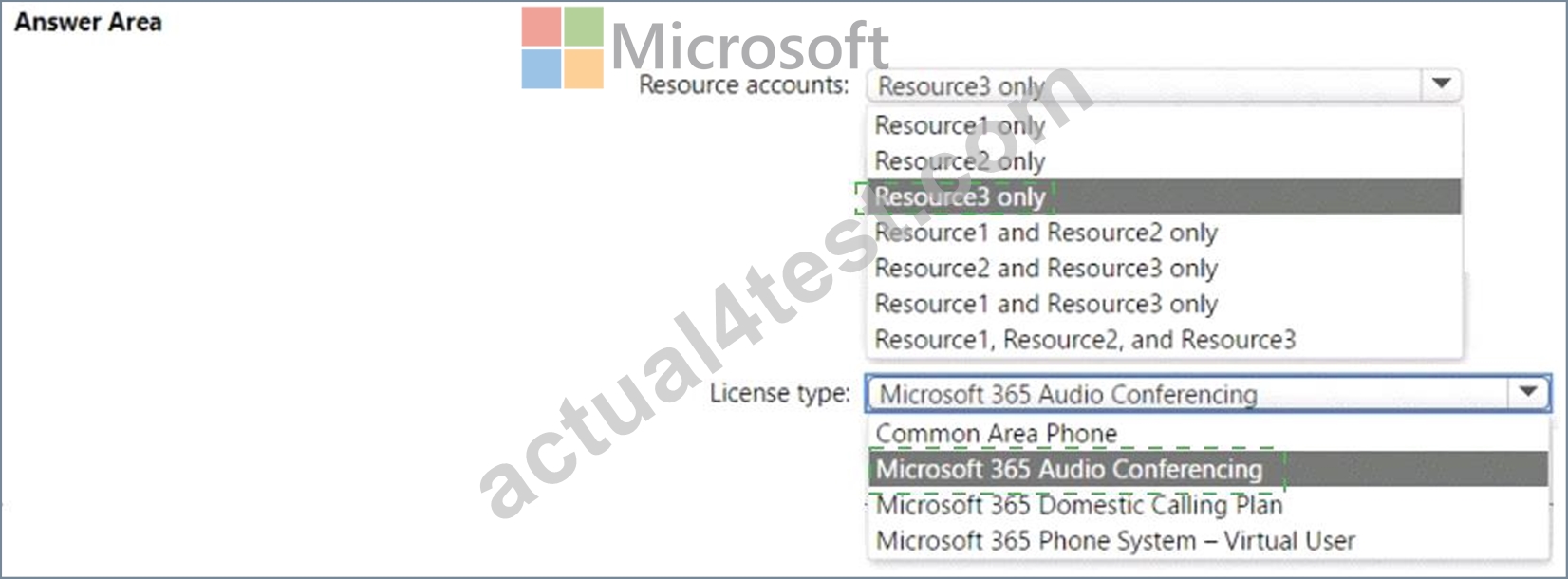
Explanation
NEW QUESTION # 194
You need to configure data retention policies for the teams. The solution must meet the data retention requirements.
Which content location should you include in the retention policies? To answer, drag the appropriate content locations to the correct requirements. Each content location may be used once, more than once, or not at all. You may need to drag the split bar between panes or scroll to view content.
NOTE: Each correct selection is worth one point.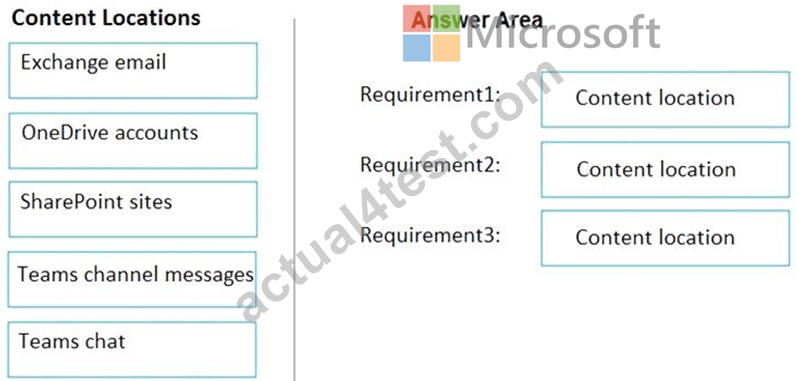
Answer:
Explanation:
Reference:
https://docs.microsoft.com/en-us/microsoft-365/compliance/retention-policies-teams?view=o365-worldwide
https://docs.microsoft.com/en-us/microsoft-365/compliance/retention-policies-sharepoint?view=o365-worldwide
NEW QUESTION # 195
You have a Microsoft 365 subscription that uses Microsoft Teams and contains a user named User1.
You have the following Microsoft Team templates:
Manage an Event
Manage a Project
Quality and Safety
Onboard Employees
You have the Microsoft Teams template policies shown in the following table.
The Templates policy settings for User1 are configured as shown in the following exhibit.
For each of the following statements, select Yes if the statement is true. Otherwise, select No.
NOTE: Each correct selection is worth one point.
Answer:
Explanation:
Reference:
https://support.microsoft.com/en-us/office/create-a-team-from-a-template-a90c30f3-9940-4897-ab5b-988e69e4cd9c
NEW QUESTION # 196
Your company has a Microsoft Office 365 subscription.
The company has the departments and teams shown in the following table.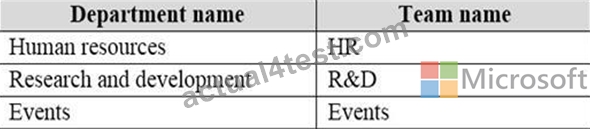
You need to ensure that only the following apps appear in the app bar of the Microsoft Teams client for only the events department:
* Activity
* Shifts
* Chat
What should you do first?
- A. Modify the global app permission policy.
- B. Create a custom app setup policy.
- C. Modify the global app setup policy.
- D. Create a custom app permission policy.
Answer: B
Explanation:
Reference:
https://docs.microsoft.com/en-us/microsoftteams/teams-app-setup-policies#assign-a-custom-app-setup- policyto-users
NEW QUESTION # 197
......
MS-700 Study Guide Brilliant MS-700 Exam Dumps PDF: https://www.actual4test.com/MS-700_examcollection.html
View MS-700 Exam Question Dumps With Latest Demo: https://drive.google.com/open?id=1ZVw3951-JumHj95t90mRHByYHqBJZTOl